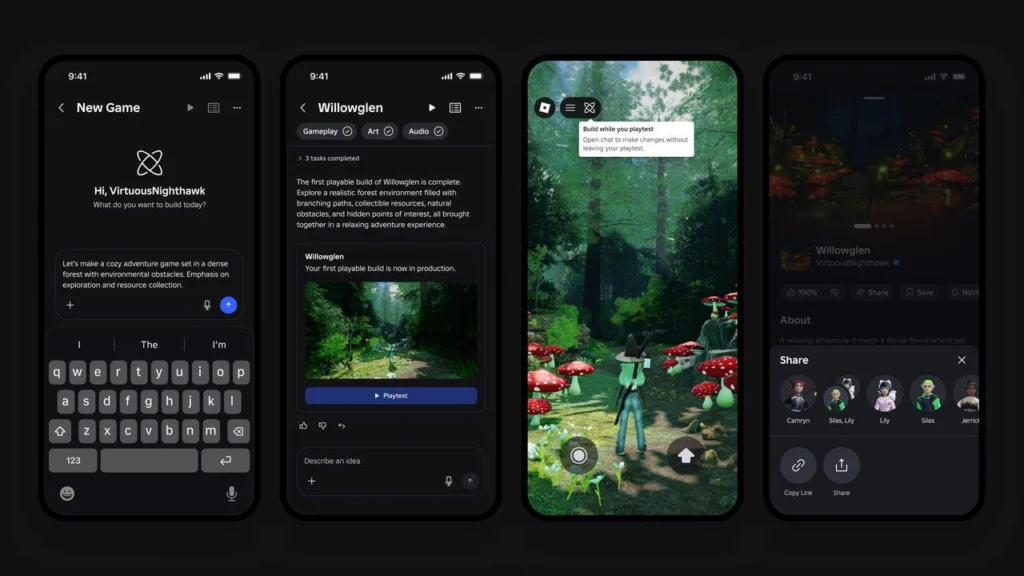

If you want to learn how to build a Roblox game with AI, Roblox’s newly announced mobile-first “Build” tool is completely changing the landscape by letting you generate, edit, and publish fully interactive 3D worlds directly from your phone using conversational prompts.
For years, game development required overcoming a steep technical barrier: mastering complex physics engines, memorizing Lua scripting syntax, and spending countless hours building 3D models from scratch. With the official debut of Build, Roblox is shifting game-making away from empty templates and toward conversational intent. Instead of starting with a blank viewport in desktop software, you co-create your world alongside Roblox’s generative AI.
What is Roblox “Build”?
Announced in July 2026, Build is a mobile-first creation tool integrated directly into the main Roblox app. It allows users to write natural language prompts to instantly generate fully playable 3D games.
Unlike static asset generators, Build doesn’t just create models; it populates a coherent world with physics-enabled terrain, custom gameplay loops, themed audio, and interactive non-player characters (NPCs). This means you can design, playtest, and launch a game globally without ever sitting down at a computer.
The Technology Powering the Tool
Behind the seamless interface lies a sophisticated, multimodal AI architecture tailored specifically for 3D environments:
- Project Cube (3D Foundation Model): Roblox’s custom model designed to generate objects that are physically and functionally interactive within the Roblox engine.
- Conversational UI Engine: Translates simple text commands into complex engine configurations, automatically establishing lighting parameters, collision boundaries, and basic logic loops.
- Cloud-Synced Asset Pipeline: Every build is saved immediately to the Roblox cloud. This means you can start a prototype on your phone during a commute and immediately open it in Roblox Studio on a desktop later to add custom Lua scripts and complex UI elements.
Step-by-Step: Building Your First AI Game on Roblox

The mobile-first Build workflow is designed to get your idea up and running in a matter of minutes. Here is how the step-by-step process works:
Step 1: Write Your Core Prompt
Open the Build tab in your Roblox mobile app and write a detailed prompt defining your game’s genre, setting, and core objective.
Example prompt: “Build a high-speed hovercraft racing game in a neon-lit cyberpunk city with sharp turns and speed boost pads.”
Step 2: Let the AI Generate the Foundation
Roblox’s backend models interpret your prompt to construct the terrain, spawn interactive vehicle assets, configure the game loops, and load thematic background music. Your first playable prototype loads in seconds.
Step 3: Refine via Conversational Commands
If the game isn’t perfect, talk to the tool to make changes. You can use prompts like “Lower the gravity by 50%” or “Add more neon streetlights.” You can also manually drag, drop, and resize objects using simple touch controls.
Step 4: Playtest Instantly
Seamlessly switch from edit mode to playtest mode. Walk around the map, drive the vehicles, test collision with obstacles, and ensure the game is fun to play.
Step 5: Publish Globally
When you are satisfied with the result, hit publish. Your game is immediately deployed to Roblox’s global servers, making it playable across mobile, console, and PC. Now you can create games like Speed Keyboard Escape.
Combating “AI Slop”: How Roblox Protects the Discovery Feed
With any tool that makes game creation effortless, there is an understandable concern that the Roblox platform will be flooded with low-quality, repetitive games. Roblox has implemented a robust defense strategy against “AI slop”:
| Threat | Roblox’s Solution |
| Spam Uploads | Roblox’s discovery engine is heavily algorithmically skewed toward user retention and play session length. Low-effort games that fail to engage players will not be surfaced on the discovery feed. |
| Repetitive Assets | The Build tool taps into a diverse, moderated asset library and constantly refines textures through generative variations to prevent worlds from looking identical. |
| Security Risks | All AI-generated scripts and behaviors are sandboxed within Roblox’s secure engine, automatically filtering out malicious code. |
Launch Timeline and Regional Availability
The rollout of Roblox Build is highly structured:
- July 28, 2026: Public alpha testing begins, starting exclusively with age-verified users (ages 9 and older) in New Zealand.
- Late 2026: Gradual regional expansion to North America, Europe, and Asia.
- Pricing tiers: A robust free base tier will be available to all registered users, with premium tiers launching later for power users who want access to more advanced AI agents and higher generation limits.
Roblox’s Build tool democratizes game creation by turning smartphones into open canvases. It removes the friction of coding, ensuring that the most successful games of tomorrow won’t just be built by programmers, but by anyone with a great story and a clear imagination.
Frequently Asked Questions
Do I need to know how to code to use Roblox “Build”?
No. The entire creation process is driven by conversational prompts in plain English. The AI automatically generates the underlying game logic, 3D terrain, and physics. However, because your mobile drafts sync directly to the cloud, you can optionally open your game in Roblox Studio on a PC later to add custom Lua scripts.
Can I make money from games created with Build?
Yes. Games built using this tool go through the exact same safety reviews, monetization setups, and catalog candidate pools as traditionally programmed games. Once published, you can implement game passes, developer products, and earn revenue from Premium Payouts based on your player retention.
Is the Roblox Build tool free, and who can play the games?
The base-level version of Build is completely free for all creators. While the creation tool is open to users aged 9 and older starting with the New Zealand alpha on July 28, 2026, the finished, published games will be globally playable for age-checked users 16 and older after passing automated safety filters.


